
What Is Level 1, Level 2, And Level 3 IT Support?

Technology plays a huge role in our daily lives, both personally and professionally. With this dependence on technology comes the need for reliable IT support. Businesses often encounter technical issues that require assistance, and IT support is essential for keeping operations running smoothly. In this blog, we will explore the three levels of IT support: Level 1, Level 2, and Level 3. Understanding these levels can help you identify the right support for your needs and ensure that technical issues are resolved effectively.

What Is IT Support?

IT support refers to the services provided to help users with technical problems related to computer systems, software, hardware, and networks. Support teams help troubleshoot issues, answer questions, and provide guidance to ensure that technology works efficiently. IT support can be divided into three levels, each with specific responsibilities, expertise, and escalation processes.

IT Support: L1 vs L2 vs L3
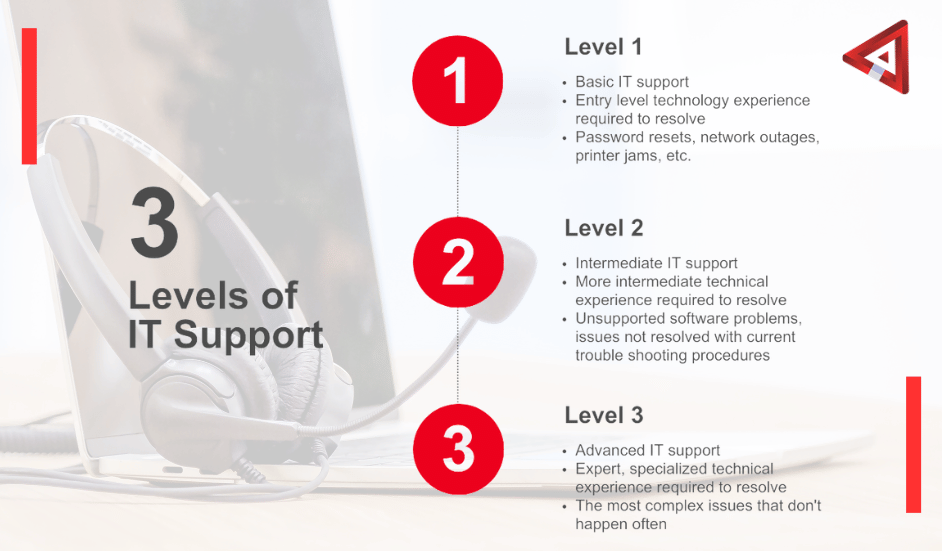
Levels of It Support

Level 1 IT Support: The First Line of Defense

Overview

Level 1 IT support, also known as help desk support, is the first point of contact for users experiencing technical issues. This level of support typically involves basic troubleshooting and customer service. Level 1 technicians are trained to handle common issues that users may face, such as password resets, software installation, and simple hardware problems.

Responsibilities

  • Answering Support Tickets: Level 1 technicians respond to support requests submitted through help desk systems, emails, or phone calls. They prioritize these requests based on urgency and impact on the business.
  • Troubleshooting Basic Issues: They follow scripts and checklists to help users troubleshoot common problems. This might include checking network connectivity, software settings, and user accounts.
  • Providing Guidance: Level 1 technicians often provide step-by-step instructions to help users resolve their issues. This could include guiding users on how to reset their passwords or how to set up a printer.
  • Escalating Complex Issues: If a Level 1 technician cannot resolve the issue, they escalate it to Level 2 support. This ensures that more complex problems are handled by technicians with greater expertise.

Skills and Qualifications

Level 1 technicians typically have the following skills:

  • Understanding of Networking Fundamentals:
  • Excellent communication and customer service skills
  • Problem-solving abilities
  • Familiarity with common software applications

Level 1 support is often an entry-level position, and technicians may have certifications such as CompTIA A+ or ITIL Foundation.

Level 2 IT Support: The Specialists

Overview

Level 2 IT support handles more complex technical issues that Level 1 technicians cannot resolve. This level of support requires a deeper understanding of systems, networks, and software. Level 2 technicians often have specialized knowledge and experience in specific areas of IT.

Responsibilities

  • Handling Escalated Issues: Level 2 technicians work on problems escalated from Level 1 support. They analyze the issues in greater detail, utilizing their advanced knowledge to troubleshoot and resolve problems.
  • Performing Diagnostics: Level 2 support may involve running diagnostic tests and using specialized tools to identify and fix technical issues. This may include checking server performance, investigating network outages, or analyzing application errors.
  • Installing and Configuring Software: Level 2 technicians may assist with the installation and configuration of software applications, ensuring they work properly on users’ devices.
  • Documenting Solutions: They keep records of issues and their solutions in knowledge bases or ticketing systems, helping to build a library of solutions for future reference.
  • Training Level 1 Technicians: Level 2 technicians may provide guidance and training to Level 1 staff, sharing their knowledge and helping to develop their skills.

Skills and Qualifications

Level 2 technicians generally possess:

  • In-depth knowledge of operating systems, networking, and hardware
  • Strong analytical and troubleshooting skills
  • Experience with various software applications and tools
  • Certifications like CompTIA Network+, Microsoft Certified Solutions Expert (MCSE), or Cisco Certified Network Associate (CCNA)

Level 3 IT Support: The Experts

Overview

Level 3 IT support is the highest level of technical support, dealing with the most complex issues that require expert knowledge. This level is typically staffed by experienced IT professionals, such as system architects, software developers, or network engineers. Level 3 support often focuses on resolving significant technical problems and implementing solutions that require specialized skills.

Responsibilities

  • Resolving Critical Issues: Level 3 technicians tackle high-priority and complex problems that other levels cannot resolve. This may include dealing with system outages, security breaches, or critical application failures.
  • Developing Solutions: They may develop new tools, scripts, or applications to address recurring issues or improve system performance. This might involve coding, system integration, or custom software development.
  • Researching and Analyzing Problems: Level 3 technicians spend time researching potential solutions, analyzing system logs, and collaborating with vendors or other experts to find the root cause of issues.
  • Implementing Changes: They may be responsible for implementing changes to systems or processes to prevent future problems. This could include applying patches, updating software, or reconfiguring hardware.
  • Mentoring Level 1 and Level 2 Technicians: Level 3 technicians often provide mentorship and training for technicians at lower levels, sharing their expertise and helping to improve the overall support team’s knowledge.

Skills and Qualifications

Level 3 technicians typically have:

  • Extensive knowledge of IT systems, networks, and software development
  • Strong analytical and problem-solving skills
  • Experience in project management and system design

Advanced certifications, such as Certified Information Systems Security Professional (CISSP), Certified Information Systems Auditor (CISA), or vendor-specific certifications.

Final Thoughts

Understanding the different levels of IT support—Level 1, Level 2, and Level 3—can help you navigate the world of technology more effectively. Each level has its unique responsibilities, expertise, and escalation processes, ensuring that technical issues are addressed efficiently and effectively.

Level 1 support focuses on basic troubleshooting and customer service, while Level 2 support deals with more complex issues that require specialized knowledge. Level 3 support handles the most critical problems and implements advanced solutions, often mentoring the lower levels of support.

By recognizing the value of each level, businesses can ensure that they have the right tech support in place to address their IT challenges. Whether you are a small business or a large corporation, having a well-structured IT support system can make a significant difference in keeping your technology running smoothly and efficiently.


What Is Bookkeeping? 

Bookkeeping is one of the most important tasks for any business. It involves keeping track of all financial transactions, such as sales, purchases, payments, and receipts. Simply put, bookkeeping is about recording every financial movement in your business in an organized way. This helps companies to understand their financial health, plan for the future, and make informed decisions.

In this blog, we’ll explore bookkeeping, why it’s important, and how it works in everyday business operations.

What Is Bookkeeping?

At its core, bookkeeping is tracking and recording a company’s financial transactions. It involves organizing these transactions into categories like income, expenses, assets, liabilities, and equity.

The main goal of bookkeeping is to ensure that a company’s financial records are accurate and up-to-date. This provides a clear picture of the company’s financial position, allowing owners or managers to make informed decisions.

Why Is Bookkeeping Important?

For any business, big or small, bookkeeping is essential. Here’s why:

  • Tracking Financial Performance: Bookkeeping helps you monitor the performance of your business. By keeping track of all your income and expenses, you can see if your business is making a profit or loss.
  • Budgeting: Bookkeeping allows businesses to create accurate budgets. When you have a clear record of past financial transactions, you can predict future spending and set financial goals.
  • Tax Compliance: Having detailed financial records makes it easier to file taxes. With organized records, you can ensure that you’re paying the right amount of tax and taking advantage of any tax deductions.
  • Legal Requirement: Many countries require businesses to keep financial records by law. Proper bookkeeping ensures that businesses comply with legal requirements and are prepared in case of audits.
  • Informed Decision-Making: Bookkeeping provides the data needed to make important business decisions. Without clear financial information, it’s hard to know if you can afford to invest in new equipment, hire more staff, or expand your business.
  • Attracting Investors: If you want to bring in investors or apply for a loan, you’ll need to show them accurate financial statements. A good bookkeeping system allows you to generate these statements easily, showing the financial health of your business.

How Does Bookkeeping Work?

Bookkeeping may sound complicated, but it can be broken down into simple steps. Let’s go over the basic elements of bookkeeping.

1. Recording Transactions

The first step in bookkeeping is recording all financial transactions. This includes every sale, purchase, payment, and receipt. Bookkeepers usually categorize these transactions into different accounts. For example:

  • Sales: Money earned from selling products or services.
  • Expenses: Money spent on items like rent, utilities, supplies, or employee wages.
  • Assets: Things the company owns, such as cash, inventory, or equipment.
  • Liabilities: Money the business owes, such as loans or unpaid bills.
  • Equity: The owner’s financial interest in the company, which includes any investments or retained earnings.

There are two methods of recording transactions: single-entry and double-entry bookkeeping.

  • Every transaction is only entered once in single-entry bookkeeping. It’s similar to keeping a personal checkbook, where you simply record money going in or out of your account. This method is often used by small businesses with simple financial structures.
  • Double-entry bookkeeping requires recording each transaction twice: once as a debit and once as a credit. This ensures that the company’s books always balance. Most businesses use double-entry bookkeeping because it’s more accurate and provides a clearer picture of the financial situation.

2. Managing the General Ledger

The general ledger is where all of the recorded transactions are stored. It’s like a master list of everything that happens financially in the business. Bookkeepers record each transaction in the ledger by using accounts, such as “Sales Revenue” for income or “Utilities Expenses” for bills.

For every transaction recorded in the ledger, there must be an equal entry in another account. This is known as the double-entry system. For example, if a company sells a product for $100, the bookkeeper will record $100 in the sales revenue account and $100 in the cash account, reflecting the money coming in from the sale.

3. Categorizing Transactions

Once transactions are recorded, they need to be categorized. This helps organize financial data and makes it easier to generate financial reports. Common categories in bookkeeping include:

  • Revenue: Money earned from selling goods or services.
  • Expenses: Costs incurred to operate the business, such as rent, salaries, or office supplies.
  • Assets: Anything valuable the company owns, like inventory or real estate.
  • Liabilities: Debts or financial obligations, such as loans or outstanding invoices.
  • Equity: The net value of the company, calculated as assets minus liabilities.

Properly categorizing transactions helps ensure that financial records are clear and easy to understand.

4. Reconciling Accounts

Reconciliation is the process of comparing your records with external statements to ensure everything matches up. For example, bookkeepers will often reconcile the company’s bank account with its general ledger to ensure that the amounts recorded match the bank’s statements.

Reconciliation is important because it helps catch mistakes, such as missing transactions or incorrect amounts. Regular reconciliation ensures that the business’s books are accurate and up-to-date.

5. Creating Accounting Reports

At the end of each accounting period, bookkeepers generate financial statements that summarize the company’s financial activities. The most common financial statements are:

  • Income Statement: Shows the company’s revenue and expenses over a specific period, indicating whether the business made a profit or loss.
  • Balance Sheet: Provides a snapshot of the company’s financial position by listing assets, liabilities, and equity.
  • Cash Flow Statement: Tracks the flow of cash into and out of the business, showing how well the company is managing its cash.

These financial statements are crucial for business owners, investors, and tax authorities to understand the company’s financial health.

6. Keeping Records Organized

Proper bookkeeping also involves keeping financial records organized and secure. This includes receipts, invoices, bank statements, and other documents related to financial transactions. Businesses are often required to keep these records for a certain number of years in case of audits or disputes.

Using bookkeeping software like QuickBooks, Xero, or FreshBooks can help keep everything organized and reduce the risk of errors. Many of these programs can automatically categorize transactions, reconcile accounts, and generate financial reports, making bookkeeping easier and more efficient.

Types of Bookkeepers

There are different types of bookkeepers that businesses can hire, depending on their needs:

  • In-House Bookkeepers: These are employees who work full-time or part-time within the company to manage its finances. They are usually responsible for the day-to-day bookkeeping tasks.
  • Freelance Bookkeepers: These are independent professionals who work remotely to handle bookkeeping tasks for multiple businesses. They provide flexibility for smaller businesses that don’t need a full-time bookkeeper.
  • Bookkeeping Firms: These are companies that offer bookkeeping services to businesses on a contract basis. They often have a team of bookkeepers to handle various financial tasks.
  • Virtual Bookkeepers: These are bookkeepers who work entirely online, using cloud-based software to manage the company’s financial records. Virtual bookkeepers offer convenience and are often more affordable than hiring in-house staff.

Final Thoughts

Bookkeeping is a vital part of running a business. It helps keep track of every financial transaction, from sales to expenses and ensures that all records are accurate and organized. By following proper bookkeeping practices, businesses can improve their financial health, stay compliant with tax laws, and make informed decisions.

Whether you’re a small business owner or managing a larger company, investing in proper bookkeeping can save you time, reduce stress, and give you the financial insights you need to grow your business. With the right tools and support, bookkeeping doesn’t have to be complicated—it can be a simple and effective way to keep your business on track.

Who are Administrative Virtual Assistants?

Managing an office can be a challenging task. Many businesses are turning to Administrative Virtual Assistants (AVAs) to help streamline their operations and make their work lives easier. But what exactly is an AVA, and how can they help your business? In this blog, we’ll explore what administrative virtual assistants do, their benefits, and how to integrate them into your office management.

What is an Administrative Virtual Assistant?

An Administrative Virtual Assistant is a professional who provides administrative support from a remote location. They can handle various tasks such as scheduling appointments, managing emails, data entry, bookkeeping, and more. AVAs work independently and can adapt to the needs of your business, providing flexibility and efficiency.

How Do Administrative Virtual Assistants Work?

Administrative Virtual Assistants use technology to communicate and complete tasks. This is a brief explanation of how they function:

  • Communication: You can contact your AVA through email, phone, or messaging apps. Regular meetings can help keep everyone on the same page.
  • Task Management: You assign tasks based on your needs. AVAs often use project management tools to track progress and deadlines.
  • Remote Access: AVAs may need access to certain software or files to complete their tasks. This is usually done securely through shared drives or remote desktop applications.
  • Feedback and Adjustment: As tasks are completed, you can provide feedback to ensure the AVA understands your preferences and can adjust their work accordingly.

Benefits of Using Administrative Virtual Assistants

1. Cost Savings

Hiring a full-time employee comes with costs like salaries, benefits, and office space. With an AVA, you pay for the work you need without the extra expenses. This can significantly reduce overhead costs for your business.

2. Increased Efficiency

AVAs are skilled in managing various administrative tasks, allowing your team to focus on more critical work. This can lead to increased productivity and better use of resources.

3. Flexibility

One of the best aspects of hiring an Admin VA is flexibility. You can hire them for specific projects, a few hours a week, or full-time, depending on your needs. This allows you to scale your support as your business changes.

4. Access to a Wide Range of Skills

Many AVAs come with diverse backgrounds and skills. Whether you need help with social media management, customer service, or bookkeeping, there’s likely an AVA with the expertise you need.

5. 24/7 Availability

Depending on the time zone of your AVA, you might be able to get support outside regular business hours. This can be especially useful for businesses that operate in multiple time zones or have urgent tasks that need immediate attention.

6. Reduced Stress

With an AVA handling administrative tasks, you and your team can concentrate on what matters most. This can improve overall job satisfaction.

Tasks Administrative Virtual Assistants Can Handle

Administrative Virtual Assistants can take on a wide variety of tasks. Here are some common responsibilities they can manage:

1. Calendar Management

AVAs can schedule meetings, send reminders, and ensure that your calendar stays organized. This helps you avoid double bookings and ensures you’re always on time for appointments.

2. Email Management

They can help sort through emails, respond to routine inquiries, and flag important messages. This can keep your inbox organized and reduce the time spent on email management.

3. Data Entry and Management

AVAs can handle data entry tasks, updating databases, and organizing information. This ensures that your records are accurate and easily accessible.

4. Research

If you need information on a specific topic or industry trends, an AVA can conduct research and present you with the findings. This saves you time and provides valuable insights.

5. Customer Support

Many AVAs can handle customer inquiries, manage social media accounts, or assist with online chat support. This can improve customer satisfaction and allow you to focus on core business activities.

6. Bookkeeping and Invoicing

If you need help with basic bookkeeping, invoicing, or expense tracking, an AVA can assist with these tasks, ensuring your financial records are organized and up to date.

How to Find the Right Administrative Virtual Assistant?

1. Identify Your Needs

Before searching for an AVA, identify the specific tasks you need help with. This will help you find someone with the right skills and experience.

2. Look for Experience and Skills

When considering candidates, look for those with relevant experience in the tasks you need assistance with. Check their portfolios and client testimonials to gauge their expertise.

3. Conduct Interviews

Once you have a shortlist of potential AVAs, conduct interviews to get a better sense of their communication skills and how they fit with your team. Ask about their previous experience and how they handle specific tasks.

4. Start with a Trial Period

Consider starting with a trial period to see how well the AVA fits into your workflow. This allows you to assess their skills and determine if they meet your needs.

5. Establish Clear Expectations

Once you hire an AVA, set clear expectations regarding tasks, deadlines, and communication methods. This helps ensure that both parties are on the same page from the start.

Tips for Working Effectively with an Administrative Virtual Assistant

1. Communicate Regularly

Keep lines of communication open. Regular check-ins can help you stay updated on progress and provide feedback.

2. Use Project Management Tools

Consider using project management tools like Trello, Asana, or Monday.com. These tools can help both you and your AVA track tasks, deadlines, and project progress.

3. Be Clear and Specific

When assigning tasks, be as clear and specific as possible. This helps your AVA understand exactly what you expect and reduces the chances of misunderstandings.

4. Provide Resources

If your AVA needs specific tools or resources to complete their tasks, ensure they have access. This can include software, documents, or guidelines.

5. Offer Feedback

Provide constructive feedback on the work your AVA completes. This helps them improve and better meet your expectations.

Final Thoughts

Administrative Virtual Assistants can be a valuable asset for any business looking to improve office management. By handling various administrative tasks, they allow you and your team to focus on what really matters—growing your business.

With their flexibility, expertise, and cost-effectiveness, AVAs can help reduce stress and increase efficiency. To get the most out of this partnership, communicate regularly, set clear expectations, and provide the necessary resources.

By integrating an Administrative Virtual Assistant into your office management, you can create a more organized, productive, and successful work environment.

Streamlining Property Management With Real Estate Virtual Assistants

Property management is an essential, yet often demanding, task within the real estate industry. From overseeing maintenance issues to handling tenant queries, the sheer amount of responsibilities can be overwhelming, particularly for real estate agents, property managers, and landlords with extensive portfolios. In recent years, the rise of real estate virtual assistants (VAs) has provided a valuable solution for streamlining the complexities of property management. By outsourcing administrative and operational tasks to qualified virtual assistants, real estate professionals can save time, reduce operational costs, and improve overall productivity.

In this article, we will explore the growing importance of virtual assistants in real estate, their potential to revolutionize property management, and how they can benefit real estate professionals. We will also discuss the types of tasks that real estate virtual assistants can handle, the key advantages of hiring them, and best practices for integrating virtual assistants into property management workflows.

The Growing Role of Virtual Assistants in Real Estate

The concept of virtual assistance has transformed multiple industries, including real estate. A real estate VA is a professional who works remotely to support real estate agents, property managers, or brokers in handling various administrative, marketing, and customer service tasks. These assistants often have experience in the real estate industry and are equipped with the skills needed to help with specific tasks like tenant management, data entry, market research, and more.

For many years, property managers and real estate agents relied on in-house staff to handle administrative tasks, which increased operational costs and consumed valuable time. However, with the advent of modern communication tools, cloud-based systems, and real estate-specific software, virtual assistants can now seamlessly integrate into daily operations, offering both flexibility and efficiency.

The increasing reliance on virtual assistants in the real estate sector is driven by multiple factors, including:

  • Technological advancements: Tools such as CRMs (Customer Relationship Management systems), cloud-based document management systems, and property management software enable virtual assistants to collaborate remotely with ease.
  • Cost-effectiveness: By hiring virtual assistants, real estate businesses save on overhead costs, such as office space, utilities, and employee benefits, while still receiving high-quality support.
  • Scalability: Real estate virtual assistants allow businesses to scale operations quickly without the need to hire full-time employees.

Key Tasks Handled by Real Estate Virtual Assistants

  • Tenant Communication & Management: Tenant management is a crucial aspect of property management that can take up a considerable amount of time. Real estate virtual assistants can handle communication with tenants by responding to inquiries, scheduling property viewings, collecting tenant applications, and processing rental agreements. Additionally, they can manage regular updates such as rent payment reminders and coordinate maintenance requests. Real estate VAs can also be trained to handle tenant complaints and follow up on late rent payments, ensuring a smooth and efficient rental process.
  • Lease Agreement & Documentation Management: Proper documentation is essential in property management, especially when it comes to lease agreements and legal contracts. A real estate virtual assistant can assist with preparing, organizing, and managing lease agreements, as well as ensuring compliance with local regulations. This includes drafting contracts, sending electronic copies for signatures, and updating digital filing systems for easy retrieval of documents when needed. Virtual assistants are also skilled in maintaining up-to-date tenant records, rent rolls, and insurance certificates. 
  • Marketing & Property Listings: Effective marketing is essential for attracting tenants or buyers to properties, but it can be time-consuming for real estate professionals who are juggling multiple tasks. Real estate virtual assistants can take charge of creating and managing property listings across various platforms, such as real estate websites, social media, and MLS (Multiple Listing Service). A virtual assistant can help create compelling descriptions for properties, upload high-quality photos and videos, and monitor listing performance. Additionally, they can update listings as needed and ensure that they are optimized for search engines to attract potential clients. 
  • Lead Generation & CRM Management: Lead generation is another critical component of a successful real estate business. Virtual assistants can assist with identifying potential leads by conducting market research, cold calling, or reaching out to prospective buyers or tenants. They can also nurture leads through email campaigns or follow-up calls. Moreover, real estate virtual assistants can manage CRM systems by entering new leads, updating client details, and tracking interactions. By keeping the CRM database up to date, VAs enable real estate agents to have better visibility into client preferences, history, and upcoming opportunities.
  • Scheduling & Calendar Management: Time management is crucial for property managers and real estate agents who need to coordinate property showings, client meetings, inspections, and other appointments. A real estate virtual assistant can take over the responsibility of managing the calendar, scheduling appointments, and sending reminders to ensure that no important tasks are overlooked. Additionally, virtual assistants can handle appointment confirmations, rescheduling requests, and other administrative tasks related to scheduling.
  • Property Maintenance Coordination: Property maintenance is an ongoing concern for landlords and property managers. Coordinating repairs, inspections, and maintenance requests can be a hassle, particularly when managing multiple properties. A real estate virtual assistant can help by liaising with contractors, scheduling repairs, and following up on maintenance tasks to ensure they are completed on time. In some cases, virtual assistants can also create and maintain maintenance schedules to prevent issues from becoming emergencies. 

The Benefits of Hiring a Real Estate Virtual Assistant

  • Time Efficiency: Time is one of the most valuable resources for real estate professionals, and the delegation of administrative tasks to a virtual assistant frees up time for more strategic activities. Instead of spending hours on repetitive tasks like data entry or email management, property managers can focus on higher-level responsibilities such as client acquisition, relationship building, and growing their business.
  • Cost-Effective Solution: Hiring a full-time in-house assistant can be costly due to salary expectations, benefits, and office overhead. A real estate virtual assistant, however, offers a more cost-effective alternative. Virtual assistants typically work on a contractual or part-time basis, meaning that businesses only pay for the services they need, without additional expenses such as employee benefits or office space. Furthermore, the ability to hire VAs from different locations, including regions with lower labor costs, allows real estate businesses to save even more money without compromising on the quality of the work.
  • Scalability & Flexibility: A significant advantage of hiring virtual assistants is the flexibility and scalability they provide. As the demands of property management fluctuate, real estate professionals can easily adjust the workload assigned to their virtual assistants. This means that during peak periods, additional virtual assistants can be hired to handle the increased demand, and during slower periods, businesses can reduce their reliance on VAs without the need to lay off employees.
  • Access to a Wide Range of Skills: Real estate virtual assistants come with a variety of skill sets, from administrative expertise to marketing knowledge and property management experience. By hiring a virtual assistant with specialized skills, real estate professionals can tap into a wealth of knowledge and expertise that may not be available in-house.
  • Improved Work-Life Balance: The demanding nature of real estate can lead to burnout, particularly for property managers who are constantly dealing with tenant issues, maintenance requests, and administrative tasks. By outsourcing a portion of the workload to a real estate virtual assistant, professionals can achieve a better work-life balance, reducing stress and preventing burnout.

Best Practices for Integrating Real Estate Virtual Assistants

  • Clearly Define Roles and Expectations: Before hiring a virtual assistant, it is important to clearly define the tasks and responsibilities that the assistant will be handling. Create a detailed job description and communicate your expectations regarding deadlines, quality of work, and reporting procedures.
  • Utilize the Right Tools and Technology: Collaboration is key when working with virtual assistants, so it is important to use the right tools and technology to stay connected. Cloud-based project management tools like Asana or Trello can help track progress, while communication tools such as Slack or Zoom enable real-time collaboration. Integrating property management software and CRM systems ensures that virtual assistants have access to the information they need to perform their tasks efficiently.
  • Provide Training & Support: Even though real estate virtual assistants often come with experience, providing training specific to your business is essential. This includes onboarding them on your company’s processes, tools, and communication style. Regular check-ins and feedback sessions can also help ensure that tasks are being completed to your satisfaction.
  • Establish Clear Communication Channels: Since virtual assistants work remotely, establishing clear and consistent communication is crucial. Set expectations for response times, preferred methods of communication, and regular reporting schedules. Transparent communication ensures that the assistant stays aligned with your business goals and objectives.

Final Thoughts

The rise of real estate virtual assistants has provided a powerful solution for streamlining property management. By delegating tasks such as tenant communication, lease management, marketing, and maintenance coordination to virtual assistants, real estate professionals can save time, reduce operational costs, and focus on scaling their businesses. With the right approach, real estate virtual assistants can become invaluable assets in simplifying and optimizing property management workflows, ultimately leading to improved business outcomes and a better work-life balance for real estate professionals.

Regardless of the size of the business you represent, If you’re considering hiring real estate virtual assistants for your projects, VoxtenD is here to help. Our suite of expert services covers all aspects of real estate management and beyond, ensuring that your business gets the help it needs, no matter the size or needs of your business. With round-the-clock availability, VoxtenD is your partner in achieving business success. Contact us today to explore how our services can benefit your business.

Top 5 AI Features in MS Office and How They Can Help You

Productivity tools are constantly evolving to help us work smarter and faster. One of the leaders in this transformation is Microsoft Office, which has integrated powerful artificial intelligence (AI) features to enhance user experience and efficiency. In this blog, we will explore the top five AI features in MS Office that are making waves and changing the way we work. These features are user-friendly and designed to make our tasks easier, whether we are writing a report, analyzing data, or preparing a presentation.

Top 5 AI Features in MS Office

1. Microsoft Editor: Your Writing Assistant

What is Microsoft Editor?

Microsoft Editor is an AI-powered writing assistant available in Word and Outlook. It helps users improve their writing by providing suggestions on grammar, spelling, and style. Whether you are drafting an email or writing a long document, Microsoft Editor ensures your text is clear, concise, and error-free.

Key Features

  • Grammar and Spelling Check: Microsoft Editor detects and corrects grammar and spelling errors. It goes beyond basic corrections to provide advanced suggestions, ensuring your writing is polished.
  • Style Suggestions: The AI analyzes your writing style and offers suggestions to make your text more readable and engaging. This includes recommendations for clarity, conciseness, and formality.
  • Plagiarism Check: Microsoft Editor can compare your text against a vast database to identify potential plagiarism, ensuring your work is original and properly cited.

How It Helps

Microsoft Editor saves time by catching errors that might be missed during manual proofreading. It helps users improve their writing skills by providing real-time feedback and suggestions. This feature is especially useful for professionals, students, and anyone who wants to produce high-quality written content.

2. Excel Insights: Making Data Analysis Easy

What is Excel Insights?

Excel Insights is an AI feature in Microsoft Excel that simplifies data analysis. It automatically analyzes your data and provides insights, trends, and patterns without the need for complex formulas or manual calculations.

Key Features

  • Automated Analysis: Excel Insights scans your data and highlights key trends, patterns, and outliers. It provides visual summaries, charts, and pivot tables to help you understand your data better.
  • Natural Language Queries: You can ask Excel questions about your data in plain English. For example, you can type, “What are the top sales regions?” and Excel will generate the answer with relevant charts.
  • Anomaly Detection: The AI identifies anomalies in your data, such as sudden changes or unusual patterns, helping you spot potential issues quickly.

How It Helps

Excel Insights empowers users to make data-driven decisions without needing advanced analytical skills. It saves time by automating the analysis process and providing clear, actionable insights. This feature is particularly beneficial for business professionals, analysts, and anyone working with large datasets.

3. PowerPoint Designer: Creating Stunning Presentations

What is PowerPoint Designer?

PowerPoint Designer is an AI tool in Microsoft PowerPoint that helps users create visually appealing presentations. It provides design suggestions and layout options based on the content of your slides.

Key Features

  • Design Suggestions: PowerPoint Designer analyzes the content on your slides and offers design suggestions to enhance the visual appeal. It recommends layouts, graphics, and color schemes that match your content.
  • Automatic Formatting: The AI adjusts the formatting of your slides to ensure consistency and professionalism. This includes aligning text, resizing images, and applying themes.
  • Image Recognition: PowerPoint Designer can recognize the content of your images and suggest relevant design elements, such as icons and infographics, to complement your visuals.

How It Helps

PowerPoint Designer saves time and effort by providing instant design ideas, allowing users to focus on the content rather than the layout. It helps create professional-looking presentations with minimal design skills, making it ideal for students, educators, and business professionals.

4. Cortana Integration: Your Personal Assistant

What is Cortana?

Cortana is Microsoft’s AI-powered virtual assistant integrated into various Office applications. It helps users manage their schedules, set reminders, and perform tasks using voice commands.

Key Features

  • Calendar Management: Cortana can schedule meetings, set reminders, and send notifications about upcoming events. It integrates with Outlook to provide a seamless experience.
  • Task Automation: You can use Cortana to automate routine tasks, such as sending emails, updating to-do lists, and managing contacts.
  • Voice Commands: Cortana allows you to perform tasks using voice commands, making it easy to operate Office applications hands-free.

How It Helps

Cortana enhances productivity by streamlining routine tasks and providing timely reminders. It helps users stay organized and manage their time effectively. This feature is particularly useful for busy professionals, executives, and anyone who wants to optimize their workflow.

5. Microsoft Search: Finding Information Quickly

What is Microsoft Search?

Microsoft Search is an AI-powered search engine integrated into Office 365 applications. It helps users find information quickly and efficiently, whether it’s a document, an email, or a piece of data.

Key Features

  • Unified Search: Microsoft Search provides a unified search experience across all Office 365 applications, including Word, Excel, PowerPoint, and Outlook. You can search for files, emails, contacts, and more from a single interface.
  • Intelligent Suggestions: The AI offers intelligent suggestions based on your search queries, making it easier to find relevant information. It also learns from your search history to provide personalized results.
  • Contextual Search: Microsoft Search understands the context of your queries and provides relevant results. For example, if you search for a project name, it will show related documents, emails, and calendar events.

How It Helps

Microsoft Search saves time by providing quick and accurate search results. It helps users find information across multiple applications without having to switch between them. This feature is especially useful for large organizations, teams, and individuals managing extensive data and communication.

Final Thoughts

The integration of AI features in MS Office has revolutionized the way we work, making our tasks more efficient, accurate, and enjoyable. From improving our writing with Microsoft Editor to analyzing data with Excel Insights, creating stunning presentations with PowerPoint Designer, managing our schedules with Cortana, and finding information quickly with Microsoft Search, these AI-powered tools are designed to enhance productivity and simplify our daily tasks.

As AI technology continues to evolve, we can expect even more innovative features and improvements in Microsoft Office, further transforming our work experiences and helping us achieve more with less effort. Whether you are a student, a professional, or simply someone who uses Office applications regularly, these AI features are sure to make your work life easier and more productive.

How Virtual Assistants Can Help You Save Money

Managing your time and resources effectively is crucial for personal and business success. One innovative solution that has been gaining popularity is the use of virtual assistants (VAs). A virtual assistant is a remote worker who can handle a variety of tasks, from administrative duties to specialized services. By integrating VAs into your workflow, you can significantly reduce costs and enhance productivity. This blog will explore how virtual assistants can help you save money and optimize your operations.

1. Reduced Overhead Costs

One of the most significant financial benefits of hiring virtual assistants is the reduction in overhead costs. Traditional employees require office space, utilities, equipment, and other amenities. These expenses can add up quickly, especially if you operate in a high-rent area. Virtual assistants, on the other hand, work remotely, eliminating the need for physical office space and related expenses. This can result in substantial savings for your business.

2. Lower Salary and Benefit Expenses

Hiring full-time employees comes with the added cost of salaries and benefits. Health insurance, retirement plans, paid leave, and other perks can significantly increase your payroll expenses. Virtual assistants are often hired on a contractual basis, meaning you only pay for the hours they work or the tasks they complete. This flexibility allows you to control costs more effectively and avoid the financial burden of full-time employment benefits.

3. Increased Efficiency and Productivity

Virtual assistants can help streamline your operations, leading to increased efficiency and productivity. By delegating routine tasks to VAs, you and your core team can focus on higher-priority projects that directly impact your bottom line. This improved focus can lead to better business outcomes and, ultimately, increased revenue. Additionally, VAs can work around the clock, ensuring that your business operations continue smoothly even outside of regular office hours.

4. Access to Specialized Skills

Finding the right talent for specific tasks can be challenging and expensive. Virtual assistants often come with specialized skills in areas such as digital marketing, graphic design, content creation, and more. Instead of hiring full-time employees for these roles, you can engage VAs on a project-by-project basis. This approach not only saves money but also gives you access to a diverse talent pool without the long-term commitment.

5. Flexibility and Scalability

Business needs can fluctuate throughout the year, and staffing requirements often change accordingly. Virtual assistants offer the flexibility to scale your workforce up or down as needed. During peak seasons, you can hire additional VAs to manage the increased workload. Conversely, during slower periods, you can reduce the number of VAs without the complications of layoffs or severance packages. This adaptability helps you maintain cost efficiency throughout the year.

6. Reduced Training Costs

Training new employees can be a time-consuming and expensive process. Virtual assistants, however, are typically already skilled in their areas of expertise. When you hire a VA, you can often skip the extensive training period required for full-time employees. This not only saves money but also ensures that tasks are completed efficiently from the outset. Furthermore, many VAs continuously update their skills, ensuring they remain proficient in the latest tools and technologies.

7. Lower Turnover Rates

Employee turnover can be costly, with expenses related to recruiting, training, and lost productivity. Virtual assistants generally work on a contractual basis, which can reduce the impact of turnover. If a VA decides to move on, you can quickly find a replacement without the lengthy hiring process associated with traditional employees. This continuity helps maintain productivity and minimizes the costs associated with employee turnover.

8. Time Savings

Time is money, and virtual assistants can help you save both. By handling routine and time-consuming tasks, VAs free up your schedule, allowing you to focus on strategic activities that drive growth. Whether it’s managing emails, scheduling appointments, or conducting research, VAs can take care of the details, giving you more time to concentrate on what matters most.

9. Enhanced Work-Life Balance

For small business owners and entrepreneurs, maintaining a healthy work-life balance can be challenging. The pressure to handle every aspect of the business often leads to burnout and decreased productivity. Virtual assistants can help alleviate this burden by managing administrative tasks and other responsibilities. By delegating these duties, you can achieve a better work-life balance, which ultimately contributes to long-term success and well-being.

10. Geographic Independence

Virtual assistants can work from anywhere in the world, providing you with access to a global talent pool. This geographic independence means you can find highly skilled VAs in regions with lower living costs, translating to lower hourly rates. By leveraging this advantage, you can secure top-tier talent at a fraction of the cost you might pay for local employees.

11. Focus on Core Competencies

Every business has core competencies that drive its success. However, managing non-core activities can divert attention and resources away from these crucial areas. Virtual assistants can handle peripheral tasks, allowing you to concentrate on your core competencies. This focus can lead to better business performance and more efficient use of resources, ultimately saving money.

12. Improved Customer Service

Excellent customer service is essential for retaining clients and growing your business. Virtual assistants can help you provide timely and effective customer support, ensuring that inquiries and issues are addressed promptly. This improved service can enhance customer satisfaction and loyalty, leading to repeat business and positive word-of-mouth referrals. In the long run, this can result in increased revenue and reduced marketing costs.

13. Competitive Advantage

In a competitive market, businesses must find ways to stand out and operate efficiently. Utilizing virtual assistants can give you a competitive edge by allowing you to run a leaner, more agile operation. The cost savings and increased productivity gained from using VAs can be reinvested into other areas of your business, such as product development, marketing, or expansion. This strategic advantage can help you stay ahead of the competition and achieve long-term success.

14. Availability of Cutting-Edge Tools and Technologies

Many virtual assistants use advanced tools and technologies to manage their tasks effectively. By hiring VAs, you can benefit from their expertise with these tools without having to invest in expensive software or training. This access can improve the efficiency of your operations and provide you with valuable insights and analytics, helping you make informed business decisions.

15. Cost-Effective Marketing Solutions

Marketing is a critical component of business growth, but it can also be one of the most expensive. Virtual assistants with expertise in digital marketing can help you implement cost-effective strategies to promote your business. From social media management to email marketing and SEO, VAs can execute targeted campaigns that generate leads and drive sales without the high costs associated with traditional marketing methods.

Final Thoughts

The benefits of hiring virtual assistants extend beyond just cost savings. They offer a flexible, scalable, and efficient solution for managing various business tasks, allowing you to focus on what truly matters. By reducing overhead costs, lowering salary and benefit expenses, and increasing productivity, virtual assistants can help you achieve significant financial savings. Moreover, their specialized skills, flexibility, and ability to work independently make them a valuable asset for any business looking to optimize operations and stay competitive in today’s market.

Incorporating virtual assistants into your business model is a smart move that can lead to long-term success. Whether you’re a small business owner, entrepreneur, or manager of a large organization, the cost savings and efficiency gains provided by VAs can help you achieve your goals and drive your business forward. So, consider hiring a virtual assistant today and experience the financial and operational benefits they bring.

How Much Does It Cost To Advertise on Instagram in 2025?

The cost of advertising on Instagram varies based on factors like bids, how relevant your ad is, the time of year, and your industry. On average, businesses spend between $0.01 and $0.25 per click, $0.01 to $4.00 for every 1,000 impressions, and $0.03 to $0.08 per engagement. If you want to know more about Instagram ad costs and tips to reduce them, check out this guide!

Instagram ad costs vs. other networks

Discover how Instagram ad costs stack up against other platforms:

Ad networkAverage CPCAverage CPM
Instagram$0.01 – $0.25 $0.01 – $4.00
Facebook$0.26 – $0.50 $1.01 – $3.00
Google Ads$0.11 – $0.50 $0.51 – $1.00
YouTube$0.11 – $0.40$9.68
X$0.26 – $0.50 $6.50
LinkedIn$2.00 – $3.00 $5.01 – $8.00
Microsoft Advertising$1.54 $2.00 to $6.00
Pinterest$0.01 – $0.10 $0.01 – $1.50
TikTok$1.00 $10.00

What affects Instagram ad costs?

Several factors influence how much you pay for Instagram ads:

  1. Budget: Your budget sets how much you’re willing to spend on a campaign or within a specific time. Instagram will aim to use your entire budget, so choose it wisely.
  2. Bid Strategy: Instagram offers different bidding options, like focusing on spending or achieving a specific goal (like a return on ad spend). Your choice can impact costs and results.
  3. Ad Objective: Your goal, whether it’s brand awareness, engagement, or leads, plays a big role in costs. Instagram tailors your ads to users most likely to take the desired action.
  4. Audience: Targeting the right audience helps control costs. Instagram lets you target users based on demographics or create custom audiences.
  5. Ad Quality and Relevance: High-quality, relevant ads cost less. Improve your targeting, ad copy, visuals, and offers to boost quality.
  6. Ad Creative: The type of ad (image, video, etc.) affects where it appears and its quality score. Make sure your creatives are clear and engaging.
  7. Season: Costs can rise during busy times, like holidays, when more advertisers compete for ad space.

Are Instagram ads worth it?

Absolutely. In fact, 76% of marketers are happy with the results and return on investment (ROI) from their Instagram ad campaigns. This proves that Instagram ads can be a powerful and effective tool for businesses.

Here are some reasons why Instagram ads are worth the cost:

  • Higher Click-Through Rates (CTRs):

Instagram often performs better than other platforms when it comes to CTRs. For example, a study by Fortune found that Instagram ads have a CTR 2.5 times higher than ads on other social media networks. However, your CTR will depend on your target audience and the quality of your ads.

  • Advanced Targeting Options

Instagram, like Facebook, offers advanced targeting features for businesses.

These tools allow you to refine your audience based on factors like location, interests, and more, helping you get better results from your ads. For example, instead of targeting all sports enthusiasts, you can focus specifically on people interested in volleyball. This precision helps improve ad performance and ROI.

  • Higher Order Values

Another reason Instagram ads are worth the cost is the results they deliver.  

A recent study by Shopify found that the average order value from Instagram users is $65. In comparison, Facebook, while generating a lot of sales, has an average order value of $55—$10 less than Instagram.  

It’s also worth noting that Facebook ads generally cost more than Instagram ads, making Instagram an even more appealing option for businesses.

  • Higher Engagement Rates

Research by Forrester shows that Instagram has much higher engagement rates compared to other platforms. In fact, Instagram’s engagement rates are ten times higher than Facebook’s.

When users are this engaged on a platform, it creates great opportunities for businesses. By creating ads that reach the right audience, you can encourage them to click on your ad, follow your page, or purchase your product. This makes Instagram a powerful tool for driving results.

  • Higher Conversion Rates

In addition to higher order values, Instagram ads also deliver better conversion rates compared to other platforms. The average conversion rate for Instagram ads is 1.08%, while Pinterest ads average 0.54% and Twitter ads 0.77%.

While Instagram ads are worth the investment, it’s important to remember that success depends on creating a strong ad campaign. Continuously improving and optimizing your strategy is key to achieving the results you want from Instagram ads.

How much should I spend on Instagram ads?

On average, businesses spend between 11% and 20% of their total ad budget on Instagram ads. The exact amount you should spend depends on your company’s specific goals, needs, and the results you’re getting from your Instagram ad campaigns. It’s important to adjust your budget based on what works best for your business.

How can I reduce my Instagram ad costs?

When advertising on social media, it’s important to find ways to lower costs while maximizing results. Here are some tips to help you reduce your Instagram ad expenses and get the most out of your budget:

  1. Improve Ad Relevance: Create ads that resonate with your target audience to boost engagement and lower costs.
  2. Refine Targeting: Use Instagram’s advanced targeting options to reach the right users and avoid wasting ad spend.
  3. Test Ad Creatives: Experiment with different images, videos, and captions to find what works best.
  4. Optimize Bidding Strategy: Choose the right bidding option for your goals, like automatic bidding for cost efficiency.
  5. Monitor Performance: Regularly review your ad performance and make adjustments to improve results.
  6. Focus on Quality: High-quality, engaging content can improve your ad’s relevance score and reduce costs.

Understanding Advertising Cost on Instagram: Instagram Ad Prices and Sponsored Posts Explained

When it comes to advertising cost on Instagram, many businesses wonder, how much Instagram ad costs and how much does Instagram charge for advertising? The Instagram ad prices can vary widely depending on factors like targeting, ad format, and competition. If you’re asking, how much does an Instagram ad cost or how much is a sponsored ad on Instagram, the answer lies in understanding Instagram sponsored posts cost and paid Instagram advertising strategies. For example, how much sponsored Instagram posts cost can range from a few dollars to thousands, depending on the influencer or campaign scope. Similarly, how much does Instagram boost cost is a common question for businesses looking to amplify their reach. If you’re considering buy Instagram ad options, it’s important to know that paid Instagram ad campaigns often operate on a CPC Instagram (cost-per-click) model, where you pay for each click. Additionally, some businesses ask, does Instagram take a percentage of sales? While Instagram doesn’t directly take a cut, paid Instagram advertising costs can impact your overall budget. Whether you’re exploring how much does ad cost on Instagram or how much is a sponsored ad on Instagram, it’s crucial to plan your paid Instagram ad strategy carefully. From Instagram ad prices to CPC Instagram metrics, understanding the advertising cost on Instagram can help you maximize your ROI. So, if you’re wondering, does Instagram cost money to advertise, the answer is yes—but with the right approach, paid Instagram advertising can deliver significant results. Whether you’re looking to buy Instagram ad space or invest in Instagram sponsored posts cost, knowing the how much Instagram ad expenses and how much does Instagram charge for advertising can help you make informed decisions. Dive into the world of paid Instagram ad campaigns and CPC Instagram metrics to optimize your advertising cost on Instagram today!

In conclusion, advertising on Instagram in 2025 remains a cost-effective and impactful strategy for businesses, with costs varying based on factors such as bidding strategies, ad relevance, audience targeting, and seasonal demand. On average, businesses can expect to spend between $0.01 and $0.25 per click, $0.01 to to $4.00 per 1,000 impressions, and $0.03 to $0.08 per engagement. Compared to other platforms like Facebook, Google Ads, and LinkedIn, Instagram offers competitive pricing and higher engagement rates, making it a valuable channel for marketers.

The Cost of a Bad Hire: What You Need to Know

In the rapidly evolving landscape of business operations, Virtual Assistants (VAs) have become indispensable assets, offering support in various administrative tasks and enhancing overall productivity. However, the process of hiring virtual assistants comes with its own set of challenges, and a bad hire can prove to be a costly affair for businesses. In this article, we’ll delve into the intricacies of the expenses associated with a suboptimal virtual assistant hire and explore strategies to avoid such pitfalls.

Understanding the Financial Impact of a Bad Hire

Hiring the wrong virtual assistant can lead to significant financial repercussions. While traditional hiring mistakes can be expensive, the virtual nature of these assistants adds unique dimensions to the costs involved. According to recent research, the average cost of hiring the wrong employee is estimated to be $17,000. This figure includes expenses related to onboarding, training, lost productivity, workflow disruption, and eventual employee turnover.

In the realm of virtual assistants, these costs may differ but are no less substantial. The virtual environment amplifies the importance of effective communication, self-motivation, and task management. A bad virtual assistant hire can result in delays, miscommunication, and a negative impact on project timelines, potentially leading to financial losses that extend beyond the initial hiring investment.

Strategies to Avoid Bad Virtual Assistant Hires

  • Define Specific Virtual Assistant Skills:

   – Clearly articulate both prerequisite and trained skills required for the role. Prerequisite skills are essential and should be demonstrated during the interview, while trained skills can be acquired on the job.

   – Virtual assistants should possess a range of technical and soft skills relevant to their tasks. Proficiency in virtual collaboration tools, time management, and effective communication are key attributes.

  • Streamline Virtual Assistant Interviews:

   – Reduce subjectivity in interviews by focusing on practical demonstrations of skills rather than vague, open-ended questions.

   – For example, inquire about specific virtual collaboration tools they have used in the past or how they manage their time while working remotely. This approach ensures a clearer understanding of their capabilities in a virtual work setting.

  • Objective Assessment of Soft Skills:

   – Soft skills like adaptability and teamwork can be subjective, but breaking them down into specific components makes them more objective.

   – Define the qualities that constitute a good virtual team player, such as proactive communication and the ability to work independently. Use these criteria during the interview process to assess soft skills objectively.

  • Job Requirements as Filters:

   – Clearly outline job requirements, including aspects such as flexibility with working hours, ability to meet deadlines, and familiarity with specific virtual collaboration tools.

   – This helps filter out candidates who do not align with essential job requirements, saving time and resources in the virtual assistant hiring process.

  • Learn from Past Virtual Assistant Hiring Mistakes:

   – Reflect on previous bad virtual assistant hires to identify specific skills or attributes that led to the hiring error.

   – Use this knowledge to structure interview questions that directly address the shortcomings of past hires, ensuring a more thorough evaluation of candidates.

  • Thorough Reference Checks for Virtual Assistants:

   – Request and contact references to gain insights into the candidate’s performance in a virtual work environment.

   – References can provide valuable information about the candidate’s communication skills, ability to meet deadlines, and overall effectiveness as a virtual assistant.

  • Avoid Hasty Virtual Assistant Hiring:

   – Resist the temptation to rush the virtual assistant hiring process. Being deliberate in the selection process is crucial to avoiding the costs associated with a bad hire.

   – Taking the time to assess candidates thoroughly ensures that the selected virtual assistant is not only competent but also aligned with the company’s values and work culture.

Improving Recruiting & Hiring Processes for Virtual Assistants

To mitigate the risks of bad virtual assistant hires, it’s essential to enhance recruiting and hiring processes. If subjectivity is prevalent in your existing process, consider revamping it to incorporate more objective measures of a successful virtual assistant. This approach equips hiring managers with the tools needed to identify the right virtual assistants without relying solely on subjective judgments.

Furthermore, integrating artificial intelligence (AI) tools into the virtual assistant hiring process can yield valuable insights. AI can analyze candidate responses, assess skills, and even predict success in a virtual work environment based on historical data. This data-driven approach helps mitigate subjectivity, ensuring that hiring decisions are grounded in objective assessments of a candidate’s capabilities.

Another crucial aspect is the establishment of clear performance metrics for virtual assistants. By defining key performance indicators (KPIs) relevant to the nature of virtual work, companies can set expectations and measure success effectively. Metrics such as task completion time, communication responsiveness, and project management efficiency become pivotal in evaluating a virtual assistant’s contribution to the team.

In this context, outsourcing the virtual assistant hiring process to a reputable service can be a strategic move. Experienced companies in this field specialize in providing top-notch virtual assistant services, ensuring that businesses have access to skilled professionals who meet specific prerequisites and training requirements. By leveraging their expertise in virtual assistant recruitment, businesses can minimize the risk of bad hires and optimize their virtual workforce for enhanced productivity.

Final Thoughts

The cost of a bad virtual assistant hire extends beyond monetary figures, encompassing delays, disruptions, and potential damage to a company’s reputation. By implementing a strategic and objective approach to the hiring process, businesses can significantly reduce the risks associated with virtual assistant recruitment. Recognizing the importance of specific skills, streamlining interviews, and learning from past mistakes are crucial steps in building a robust virtual workforce. As a parting note, for businesses seeking reliable virtual assistant services, VoxtenD stands out as a leading provider. With a commitment to delivering skilled virtual assistants who align with both prerequisite and trained skills, Vofox offers a solution to the challenges of virtual workforce optimization. Consider and contact VoxtenD today for your virtual assistant needs, and embark on a journey toward a more efficient and cost-effective virtual work environment.